QuickBooks Self-Employed Review A Comprehensive Look
QuickBooks Self-Employed review: This review delves into the features, user experience, and overall value proposition of QuickBooks Self-Employed, a popular accounting software for the self-employed. We’ll explore its functionalities, comparing it to competitors, and analyzing its strengths and weaknesses through various aspects, including setup, features, reporting, support, and integrations.
The software aims to streamline financial management for freelancers, consultants, and entrepreneurs. It covers everything from tracking income and expenses to managing taxes and client interactions. This review will thoroughly examine whether QuickBooks Self-Employed lives up to its promise.
Introduction to QuickBooks Self-Employed
QuickBooks Self-Employed is a dedicated accounting solution designed specifically for the self-employed and small business owners. It simplifies the often complex financial tasks of running a freelance business, side hustle, or small enterprise, making it easier to track income, expenses, and taxes. It streamlines the process of managing income and expenses, and helps ensure accurate tax reporting, ultimately freeing up time for entrepreneurs to focus on their core business activities.
This software solution is a powerful tool that provides a comprehensive suite of features tailored to the unique needs of independent professionals, consultants, freelancers, and small business owners. It helps them stay organized and compliant, whether managing a solo operation or expanding their business.
Core Functionalities and Target Audience
QuickBooks Self-Employed is designed for individuals who are self-employed, contractors, freelancers, consultants, or small business owners. Its key functionalities include automatic expense tracking, income categorization, and simplified tax reporting, specifically tailored to the self-employed. This makes it an excellent choice for those seeking a streamlined solution to manage their finances without needing extensive accounting expertise.
Key Benefits and Features
QuickBooks Self-Employed offers several advantages over other accounting software options. It excels at automating many tasks, such as categorizing transactions and automatically generating reports. This efficiency allows users to focus on growing their business rather than spending countless hours on bookkeeping. Further, the software simplifies tax reporting, ensuring accuracy and compliance. It also facilitates the creation of financial statements, offering a clear view of the business’s financial health.
Pricing Plans
QuickBooks Self-Employed offers various pricing plans to cater to different needs and budgets. The pricing structure is based on the volume of transactions and the level of support required. The different plans may include features such as additional support, enhanced reporting tools, or access to a wider range of features.
Comparison with Competitor Products
| Feature | QuickBooks Self-Employed | Xero | FreshBooks |
|---|---|---|---|
| Expense Tracking | Automatic categorization, expense reports | Manual categorization, expense reports | Manual categorization, expense reports |
| Tax Reporting | Simplified tax forms, automatic deductions | Tax forms, requires manual reconciliation | Tax forms, requires manual reconciliation |
| Invoicing | Basic invoicing, integrated with payment processing | Advanced invoicing, integrated with payment processing | Basic invoicing, integrated with payment processing |
| Pricing | Starting at $10/month (basic plan) | Starting at $15/month (basic plan) | Starting at $12/month (basic plan) |
The table above illustrates the key features and pricing of QuickBooks Self-Employed, compared to two major competitors, Xero and FreshBooks. Note that pricing and features can vary depending on the specific plan selected for each software. Consider your business’s specific needs when making a comparison.
User Experience and Interface
QuickBooks Self-Employed aims to simplify the accounting process for freelancers and small business owners. Its user interface is designed with a focus on ease of use, aiming to minimize the learning curve for users with varying levels of accounting experience. This streamlined approach is crucial for self-employed individuals who often wear multiple hats and need a tool that’s both powerful and intuitive.
Ease of Use and Intuitiveness
The platform’s design prioritizes clarity and straightforward navigation. Icons and labels are generally clear and self-, reducing the need for extensive tutorials. This intuitive design is a key differentiator compared to some other accounting software options that can feel overly complex. The overall layout and organization of the interface is consistent, making it easier for users to find the information they need. This focus on user-friendliness is particularly valuable for individuals who may not have extensive accounting knowledge.
Comparison with Other Platforms
QuickBooks Self-Employed’s interface compares favorably to other similar platforms for the self-employed. Its design is generally more streamlined and less cluttered than some competitors, which translates to a quicker learning curve. Features like automatic categorization of transactions and simplified expense tracking contribute to this perceived ease of use. However, direct comparisons are difficult without specific examples of competing platforms.
Navigation Experience and User Flow
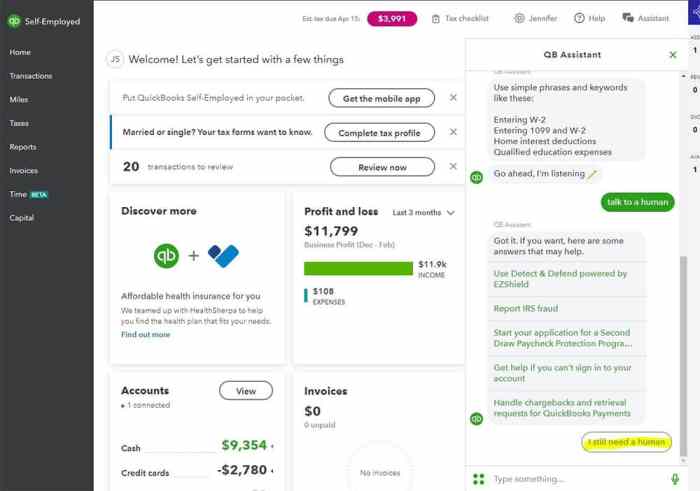
Navigating QuickBooks Self-Employed for common tasks is generally straightforward. Tracking income is accomplished through intuitive input forms and automatic categorization options. Expenses are similarly easy to input and categorize. The platform also provides clear summaries of income and expenses, making it simple to monitor financial performance.
Setting Up a Basic Account and Entering Transactions
Setting up a basic account typically involves providing personal and business information. The process is relatively simple and guided by clear prompts. Entering transactions involves specifying the date, description, category, and amount. QuickBooks Self-Employed often allows for automatic categorization, saving time and minimizing errors. The platform also offers options for uploading receipts and invoices, further simplifying the process.
- Account Setup: Provide required business and personal details. The platform guides you through the process.
- Transaction Entry: Specify date, description, category, and amount for each transaction. Choose from predefined categories or create custom ones.
- Expense Management: Use the platform to track expenses by uploading receipts or invoices, streamlining the process. Automatic categorization is available for many common expenses.
- Review and Analysis: QuickBooks Self-Employed offers comprehensive summaries of income and expenses, making it easy to monitor your financial performance.
Key Features and Interface Elements
The following table illustrates the key features of QuickBooks Self-Employed and the corresponding interface elements that support them.
| Feature | Interface Element |
|---|---|
| Income Tracking | Input forms, automatic categorization, summary reports |
| Expense Tracking | Input forms, expense categories, receipt upload |
| Invoicing | Dedicated invoicing tools, automated payment reminders |
| Tax Management | Estimated tax calculations, tax form preparation assistance |
| Financial Reporting | Charts, graphs, and customizable reports |
Features and Functionality for Self-Employed Individuals
Source: glance-intuit.net
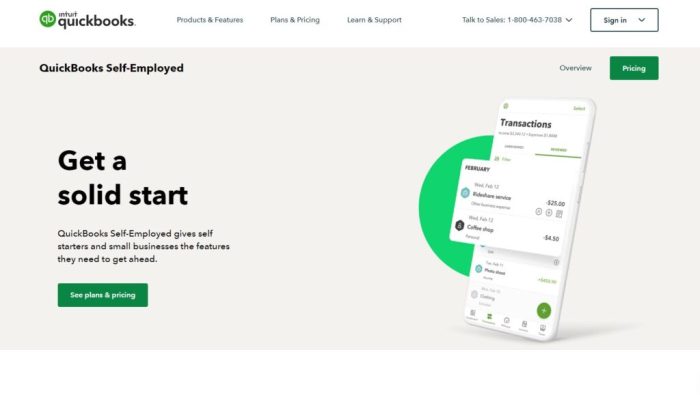
QuickBooks Self-Employed offers a comprehensive suite of features tailored to the unique financial needs of self-employed individuals. This section details the key functionalities for managing income, expenses, mileage, invoicing, taxes, client interactions, and payments, empowering self-employed professionals to effectively track and manage their finances.
Managing Income and Expenses
QuickBooks Self-Employed provides robust tools for meticulously tracking income and expenses. It allows for categorizing income streams based on different services or products, enabling a clear understanding of revenue sources. Expenses can be categorized and tracked, making it easy to distinguish business-related costs from personal ones. This detailed record-keeping ensures accurate financial reporting and simplifies tax preparation.
Tracking Business Mileage and Expenses
The platform simplifies the process of tracking business mileage. Users can log their mileage using GPS or manually inputting details. The system automatically calculates the associated expenses based on mileage and preset rates, making this process more efficient. Further, users can meticulously record various business expenses, from office supplies to travel costs, ensuring all deductible expenses are properly documented. Proper categorization and recording are crucial for maximizing tax deductions.
Creating Invoices
QuickBooks Self-Employed streamlines the invoicing process, allowing for the creation of professional invoices with customizable formats. Users can specify due dates, payment terms, and any specific instructions for their clients. This feature facilitates efficient communication with clients and streamlines the process of receiving payments. This feature is a valuable asset for self-employed professionals.
Managing Taxes and Tax Payments
The platform assists in managing taxes by providing tools for calculating estimated taxes and tracking tax payments. It offers insights into tax obligations based on the income and expenses reported, helping to proactively manage tax liabilities. The platform provides detailed reports on estimated taxes owed, ensuring timely payments and minimizing potential penalties.
Tracking and Managing Client Interactions and Payments
QuickBooks Self-Employed provides a centralized platform for managing client interactions and payments. Users can track client communication, schedule appointments, and store important client information in one location. The system also facilitates the process of sending invoices and tracking payments received, promoting transparency and efficient client management.
Detailed Features and Functionalities
| Feature | Functionality |
|---|---|
| Income Tracking | Categorize income sources, track revenue, and generate reports. |
| Expense Tracking | Categorize expenses, record receipts, and track deductible costs. |
| Mileage Tracking | Log business mileage, calculate expenses based on preset rates, and generate reports. |
| Invoice Creation | Create professional invoices, customize formats, specify due dates, and track payments. |
| Tax Management | Calculate estimated taxes, track tax payments, and generate tax reports. |
| Client Management | Track client interactions, schedule appointments, store client information, and track payments. |
Reporting and Analytics Capabilities
QuickBooks Self-Employed provides a suite of reporting tools to help self-employed individuals track their financial performance, understand trends, and make informed business decisions. These reports are crucial for managing income, expenses, and overall financial health. The reports are designed to be intuitive and easily accessible, making them valuable for individuals with varying levels of accounting expertise.
Different Reporting Options
QuickBooks Self-Employed offers a variety of reports categorized for different purposes. These reports encompass various aspects of income, expenses, and financial performance, allowing for a comprehensive view of the business’s financial health. Key categories include income reports, expense reports, profit and loss statements, and balance sheets. Each report is customizable to focus on specific time periods and categories.
Usefulness and Clarity of Generated Reports
The reports generated by QuickBooks Self-Employed are generally considered useful and clear for self-employed individuals. The visual representations and detailed breakdowns make it easy to understand financial data and identify trends. This clarity facilitates better decision-making for self-employed individuals regarding their business strategies and financial planning. The reports are structured in a user-friendly format, minimizing the need for extensive accounting knowledge.
Creating Customized Reports
Users can customize reports to track specific metrics and financial data. This customization allows for a deep dive into particular areas of interest. For example, users can tailor reports to focus on income from specific clients, expenses related to a particular project, or profitability across different service categories. This tailored approach helps individuals understand their business’s financial performance in a more nuanced way. Customization is often achieved through filters, date ranges, and selection of specific accounts or categories.
Key Financial Reports for Self-Employed Individuals
Several key financial reports are critical for self-employed individuals. A Profit and Loss (P&L) statement, for instance, highlights the profitability of the business over a specific period. A balance sheet provides a snapshot of the business’s financial position at a particular point in time, detailing assets, liabilities, and equity. Cash flow statements demonstrate the movement of cash in and out of the business, which is crucial for understanding liquidity. Furthermore, income reports provide a breakdown of income sources, and expense reports showcase detailed expenditure.
Breakdown of Available Reports and Use Cases
| Report Type | Potential Use Cases |
|---|---|
| Profit & Loss Statement | Assessing profitability, identifying areas for cost reduction, and analyzing revenue trends. |
| Balance Sheet | Evaluating the financial position of the business, determining the company’s assets, liabilities, and equity. |
| Cash Flow Statement | Understanding the flow of cash in and out of the business, assessing liquidity, and planning for future cash needs. |
| Income Report | Analyzing income sources, identifying top-performing services or products, and tracking revenue growth. |
| Expense Report | Identifying areas where expenses can be reduced, tracking spending across different categories, and controlling costs. |
Customer Support and Resources
QuickBooks Self-Employed aims to provide a smooth user experience. Effective support and readily available resources are crucial for navigating the software and resolving potential issues. This section details the support options available and highlights helpful online resources.
QuickBooks Self-Employed offers various avenues for assistance, catering to diverse needs. This includes comprehensive online documentation, readily accessible tutorials, and dedicated support channels. Understanding these options allows users to effectively utilize the software’s capabilities.
Customer Support Options
QuickBooks Self-Employed provides several support channels to assist users. These channels are designed to offer prompt and effective solutions to common issues. A combination of online resources and direct support channels can be leveraged for optimal assistance.
- Online Help Center: A comprehensive online help center provides detailed articles, FAQs, and tutorials covering a wide range of topics. This resource is invaluable for users seeking quick answers to common questions or troubleshooting steps.
- Knowledge Base Articles: Extensive articles and tutorials cover specific functionalities, providing step-by-step guidance. These articles are frequently updated to address new features and common user scenarios.
- Video Tutorials: Visual demonstrations of various functionalities are accessible through video tutorials. These tutorials are particularly helpful for users who prefer a visual learning approach and provide hands-on guidance for using the software effectively.
- Community Forums: A dedicated community forum allows users to connect with other users and share experiences. This interactive platform facilitates knowledge sharing and problem-solving amongst a community of users.
- Phone Support: Direct phone support provides a dedicated channel for users seeking personalized assistance from QuickBooks support representatives. This option is helpful for complex issues or situations where in-depth guidance is required.
Online Resources and Tutorials
The QuickBooks Self-Employed platform offers a wealth of online resources to enhance user comprehension and provide support. These resources are designed to be easily accessible and adaptable to diverse learning styles.
- QuickBooks Website: The QuickBooks website features an extensive knowledge base, providing a comprehensive repository of articles, tutorials, and FAQs. This resource is consistently updated with relevant information.
- Help Center Tutorials: The platform’s help center includes a comprehensive library of step-by-step tutorials, providing visual and written instructions for specific functionalities and tasks. These tutorials are updated regularly to reflect changes and new features.
- YouTube Channel: A dedicated YouTube channel hosts video tutorials demonstrating how to utilize QuickBooks Self-Employed. These videos offer a practical and visual approach to learning the software.
Effectiveness of Support Channels
The effectiveness of QuickBooks Self-Employed support channels is generally positive. Users report that the online resources are readily accessible and helpful for resolving common issues. However, some users may find phone support to be more effective for complex or nuanced problems.
Common Support Requests and Solutions
Common support requests often center around basic functionalities like expense tracking, invoice creation, and reporting. The typical solutions involve providing clear instructions, troubleshooting steps, and redirecting users to relevant online resources.
Support Options Summary
| Support Channel | Contact Information |
|---|---|
| Online Help Center | Available on the QuickBooks Self-Employed website |
| Knowledge Base Articles | Available on the QuickBooks Self-Employed website |
| Video Tutorials | Available on the QuickBooks Self-Employed website and YouTube |
| Community Forums | Accessible on the QuickBooks Self-Employed website |
| Phone Support | (Number provided by QuickBooks) |
Integration with Other Tools
QuickBooks Self-Employed isn’t an isolated system; its strength lies in its ability to connect with other business tools. This integration capability streamlines workflows, automating data transfers and providing a holistic view of your financial picture. This interoperability is a key feature for self-employed individuals managing multiple aspects of their business.
Available Integrations
QuickBooks Self-Employed offers a range of integrations with popular business tools, enhancing efficiency and reducing manual data entry. These integrations simplify the process of transferring data between platforms, ensuring accuracy and saving valuable time.
Connecting QuickBooks Self-Employed
Connecting QuickBooks Self-Employed to other platforms is typically straightforward. Most integrations use secure API connections. The process often involves logging into the third-party application, authorizing QuickBooks Self-Employed to access the necessary data, and confirming the connection. Detailed instructions are usually provided within the QuickBooks Self-Employed platform and often within the third-party application itself.
Examples of Popular Integrations and Benefits
Several popular integrations enhance the capabilities of QuickBooks Self-Employed. For instance, connecting with a project management tool allows tracking billable hours directly within QuickBooks Self-Employed, streamlining invoicing and expense reporting. Integrating with accounting software for clients or other businesses can automatically import and categorize transactions. Integrating with a CRM (Customer Relationship Management) system can improve customer relationship management and automatically generate invoices based on client information. Integration with payment processors can streamline the payment collection process.
Supported Integrations and Functionalities
The table below illustrates some common integrations and their key functionalities. These integrations are designed to improve efficiency and provide a more comprehensive view of your financial activities.
| Integration | Specific Functionalities |
|---|---|
| Payment Processors (e.g., Stripe, Square) | Automated payment processing, streamlined invoicing, simplified expense tracking, real-time transaction updates, and efficient reconciliation. |
| Project Management Tools (e.g., Asana, Trello) | Tracking billable hours, automatic time entry, generating project-specific invoices, and streamlined expense tracking. |
| Customer Relationship Management (CRM) Systems (e.g., Salesforce, HubSpot) | Managing customer data, automating invoice generation based on client information, improved customer relationship management, and tracking customer interactions. |
| Email Marketing Platforms (e.g., Mailchimp, Constant Contact) | Automated email campaigns, tracking email engagement, and facilitating customer communication. |
| Inventory Management Systems (e.g., Shopify) | Automated inventory tracking, streamlined ordering processes, and improved cost control. |
Pros and Cons of QuickBooks Self-Employed
QuickBooks Self-Employed aims to streamline the accounting and tax processes for self-employed individuals. Understanding its strengths and weaknesses is crucial for making an informed decision about its suitability for your business needs. This section details the advantages and disadvantages of QuickBooks Self-Employed, along with a comparison to competitor products.
Advantages of QuickBooks Self-Employed
QuickBooks Self-Employed offers several benefits for self-employed individuals seeking a streamlined accounting solution. These advantages are designed to simplify tax preparation and financial management.
- Automated Tax Tracking: The software automatically tracks income and expenses, making tax time significantly less daunting. This feature is particularly useful for freelancers and consultants who often have complex income streams.
- Simplified Expense Tracking: QuickBooks Self-Employed allows easy categorization of business expenses, which helps maintain accurate records and reduces the risk of errors.
- Streamlined Tax Filing: The software prepares tax documents in a standardized format, which can expedite the tax filing process. This can save time and effort compared to manually preparing tax forms.
- Integration with Other QuickBooks Products: This integration enables seamless data flow between different QuickBooks products, improving overall efficiency and accuracy. This is particularly valuable for businesses already using other QuickBooks products.
Disadvantages of QuickBooks Self-Employed
While QuickBooks Self-Employed offers many advantages, it also has certain limitations. These limitations should be considered before making a purchase.
- Limited Customization: The software’s customization options might be insufficient for businesses with highly specific needs or unique accounting requirements. This could lead to inefficiencies in handling particular financial situations.
- Limited Reporting Capabilities Compared to Full QuickBooks: While sufficient for basic reporting, QuickBooks Self-Employed’s reporting features may not be as comprehensive as those in the full QuickBooks desktop version. This is important for individuals requiring detailed financial analysis.
- Potential for Errors: While the software is designed to minimize errors, human intervention and data entry errors are still possible. Careful data entry and review are essential to avoid inaccuracies.
- Subscription Model: The subscription model requires ongoing payments, which may not be suitable for individuals with fluctuating financial resources. This is a common business model, but one to consider.
Comparison with Competitor Products
QuickBooks Self-Employed competes with various other accounting software solutions for the self-employed. The features and pricing models of these alternatives need to be evaluated.
| Feature | QuickBooks Self-Employed | Xero | FreshBooks |
|---|---|---|---|
| Ease of Use | Generally user-friendly, but some features might be complex for beginners. | Highly intuitive and easy to navigate. | Intuitive interface, but might lack the sophistication of Xero. |
| Pricing | Subscription-based; variable pricing depending on features. | Subscription-based; pricing models are transparent and comparable. | Subscription-based; pricing is straightforward, though potentially higher for extensive features. |
| Reporting | Basic reporting suitable for straightforward needs. | Comprehensive reporting tools for in-depth analysis. | Reporting tools are adequate for tracking basic financial data. |
Potential Improvements and Missing Features
Some areas for improvement in QuickBooks Self-Employed include enhancing customization options and expanding reporting capabilities. This would allow for greater flexibility and deeper insights into financial data.
- Enhanced Customization: Allowing more granular control over the software’s features and configurations would cater to the diverse needs of self-employed individuals.
- Improved Reporting Capabilities: Expanding reporting options to include more advanced metrics and visualizations would allow users to gain deeper insights into their financial performance. Adding advanced chart types would be useful for better analysis.
- Integration with More Third-Party Tools: Expanding the list of integrated tools would improve efficiency and streamline workflows by connecting to additional services used by self-employed individuals.
Real-World Use Cases and Examples: Quickbooks Self-employed Review

Source: ericnisall.com
QuickBooks Self-Employed offers a practical solution for freelancers, consultants, and small business owners. This section delves into real-world scenarios, demonstrating how the software streamlines financial management and business operations for various self-employed individuals. These examples highlight the software’s strengths and potential limitations, offering a nuanced perspective on its effectiveness.
Illustrative Case Studies, Quickbooks self-employed review
QuickBooks Self-Employed provides a streamlined platform for self-employed professionals to manage their finances and business operations. This section presents specific examples to illustrate its application and effectiveness.
Managing Income and Expenses
Understanding how QuickBooks Self-Employed facilitates income and expense tracking is crucial. A freelance writer, for instance, can easily input client invoices, track payments, and categorize expenses like software subscriptions, office supplies, or transportation costs. This streamlined process allows for accurate income reporting and expense deductions, crucial for tax preparation. Another example involves a graphic designer who uses the platform to input freelance project earnings and associated expenses. This approach enables a clear picture of profitability and allows for efficient tax planning.
Tracking Time and Projects
For project-based work, QuickBooks Self-Employed provides valuable tools. A web developer, for example, can use the software to meticulously record time spent on various client projects. This granular tracking enables accurate billing and project costing. Furthermore, the software allows for creating and tracking project budgets, allowing for informed decision-making.
Invoicing and Payments
QuickBooks Self-Employed streamlines the invoicing process. A consultant, for instance, can create professional invoices and send them electronically, tracking payments directly within the platform. This feature reduces administrative burden and ensures prompt payment collection. This process is crucial for maintaining cash flow and preventing late payments.
Tax Reporting and Planning
QuickBooks Self-Employed offers robust features for tax reporting and planning. A photographer, for example, can easily gather and organize receipts and expenses throughout the year, significantly reducing the burden of tax preparation. The platform’s automated reports provide insights into income and expenses, which helps in proactive tax planning. This allows for informed decisions regarding deductions and tax obligations.
Managing Multiple Clients and Projects
The software’s capacity to manage multiple clients and projects is a key advantage. A virtual assistant, for example, can utilize the platform to organize tasks, track time spent on each client’s project, and generate invoices for different clients. This organized approach ensures efficiency and accountability in handling multiple client engagements.
Closure
Source: fitsmallbusiness.com
In conclusion, QuickBooks Self-Employed offers a comprehensive suite of tools designed to manage the financial aspects of self-employment. Its ease of use, robust features, and reporting capabilities make it a compelling option for many. However, potential users should carefully consider the pricing plans and compare features with competitors to ensure it aligns with their specific needs. Ultimately, QuickBooks Self-Employed’s effectiveness depends on the individual user’s requirements and comfort level with the software.